Heroic (Epic Games)
Guide to install Town of Us: Mira via Heroic Games Launcher.
This guide requires that you own Among Us on Epic Games.
Installation
1. If you don't already have it, download Heroic Games Launcher. Once installed, log into your Epic Games account.
2. On the left-hand menu, click Wine Manager. At the top, go to the
Wine-Stable-MacOStab and download the Wine-11.7 version.3. Go to Library and install Among Us.
- Once installed, right-click the game and go to Details.
- On the right side, it will show you the installation path.
- Click the path to open the game directory.
4. Download the latest x64-Steam-Epic-MsStore.zip folder for Town of Us: Mira.
5. Extract the .zip folder. Copy all contents and paste them into the Among Us folder opened in Step 3. It should look like the example below.
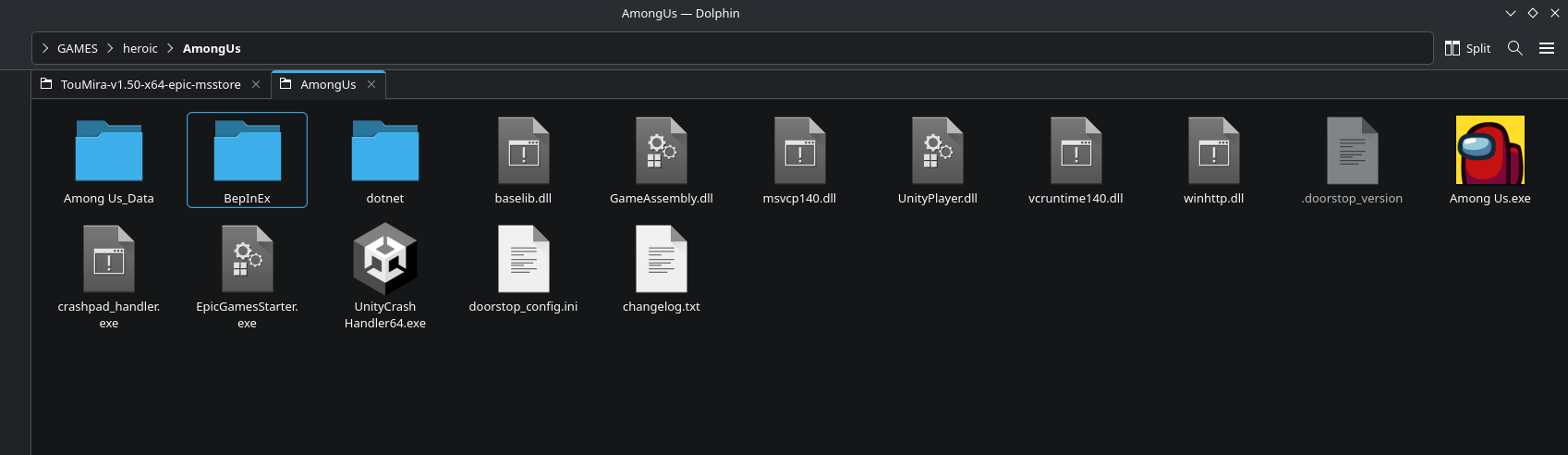
6. Go back to Heroic. Right-click Among Us again and click Settings. In the Wine Version tab, select the
Wine-11.7option downloaded in Step 2.7. Scroll to the bottom of Settings and click winecfg.
- In the new window, go to Libraries.
- Type
winhttpthen click Add.- Click Apply, then OK.
8. Launch the game via Heroic Games Launcher. (It may take a few minutes the first time you install; this is normal.)
If you encounter any issues installing, please join the Town of Us Discord server and open a Town of Us Support ticket in the TOU Support channel.