Epic Games (Heroic Launcher)
This guide requires that you own Among Us on Epic Games.
Mod Installation
1. Download the latest epic-msstore.zip folder of Town of Us: Mira.
2. On Heroic Games Launcher, in the Wine Manager tab, make sure that you have
Wine-GE-Latestinstalled.3. On the Library tab, right-click Among Us and click Details. This should show you a page with
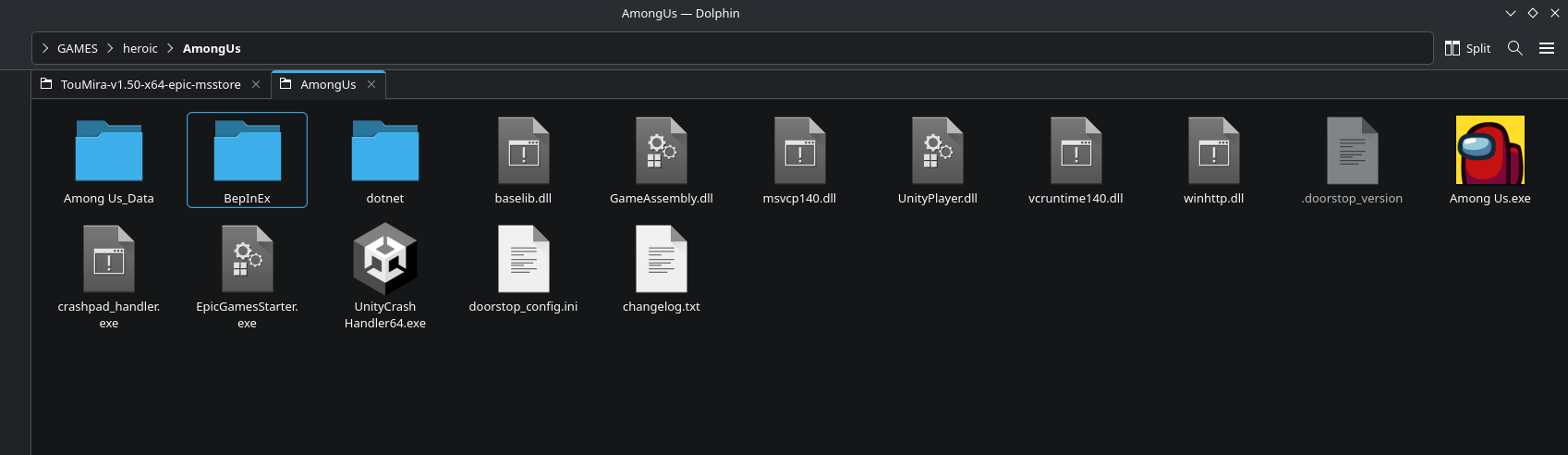
Install Path:on the right-hand side. Click that and it will open the installation folder for your game.4. Extract the contents of the .zip folder you downloaded and open it. Copy all the contents (two folders and five files) and paste them into the main Among Us folder. It should look like this example:
5. On Heroic Launcher, go to the settings menu and open winecgf using the provided button. Click Libraries, then type
wintthpin the "New override for library:" field and then press Add.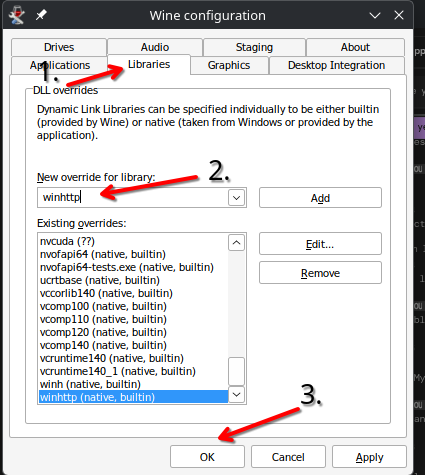
6. Launch the mod from Heroic Launcher. If successful, it will show the Town of Us: Mira logo in the top left corner.
If you encounter any issues installing, please join the Town of Us Discord server and open a Town of Us Support ticket in the TOU Support channel.